

If you’re still writing every blog post, email, and social caption from scratch, you’re spending time that AI tools for content creation and marketing could hand back to you. I’ve been running AI-assisted content pipelines since early 2024 — testing tools, breaking workflows, and figuring out what actually moves the needle versus what just looks impressive in a demo. This guide covers what I’ve learned: which tools are worth paying for, how to stack them into a real workflow, and where human oversight is still non-negotiable.
This isn’t a list post padded with tool descriptions copied from landing pages. For every platform I mention here, I’ve either used it directly or tested it against alternatives in a real publishing pipeline. For context on my background and how I approach evaluating AI tools, see the homepage and my About page.
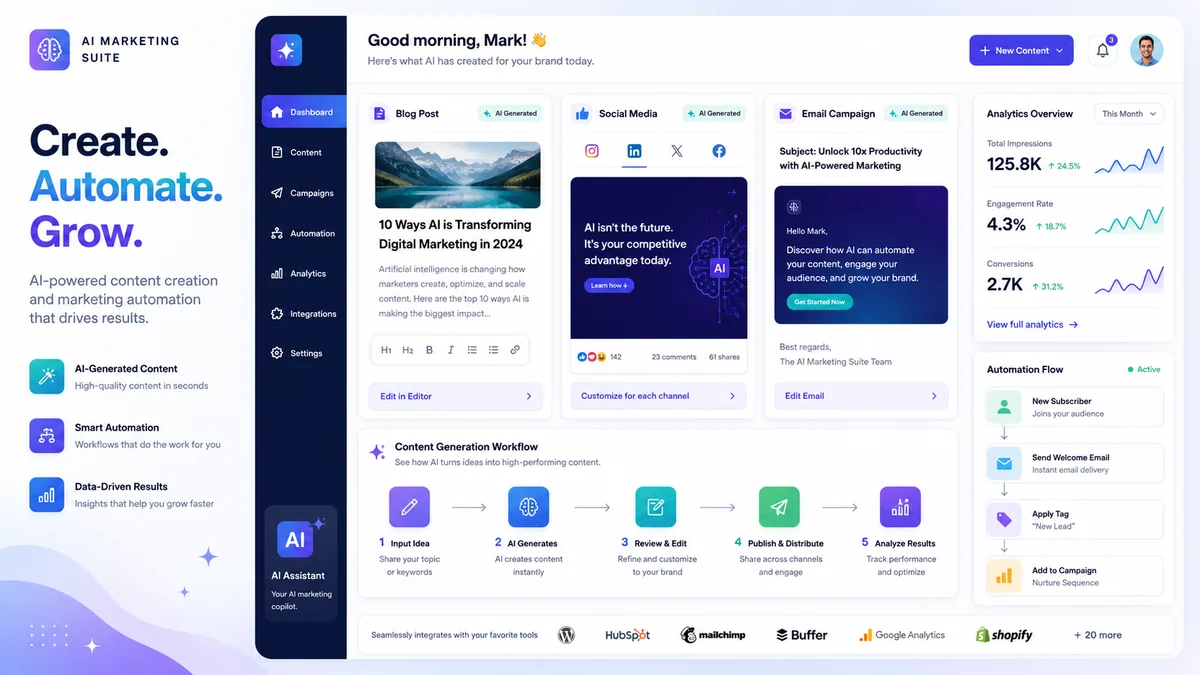
Choosing the right AI tools for content creation and marketing is now one of the highest-leverage decisions a content team can make — it determines how much you can publish, how consistently, and at what cost.
Why Most AI Content Tool Lists Get It Wrong
The standard “best AI tools for content creation and marketing” article lists 15 platforms, each with a paragraph, and calls it done. That’s not useful if you’re trying to build something that actually runs. The real question isn’t which tool has the most features — it’s which combination of tools fits together into a pipeline you can operate consistently without burning out your team.
Here’s what I’ve found after running content at volume: most businesses need fewer tools than they think, but deeper integration than they have. One AI writing platform used properly beats three used superficially every time. The goal isn’t to collect tools — it’s to reduce the number of decisions required to publish quality content at scale.
With that framing in mind, here’s how I’d categorize the landscape and what I actually use.
The businesses winning with AI tools for content creation and marketing aren’t using more tools — they’re using fewer tools more deeply, with tighter integration between each step.
AI Tools for Content Creation and Marketing: The Core Stack
Long-Form Writing: Jasper AI vs Writesonic vs ChatGPT
Jasper AI ($39–99/month) remains one of the strongest dedicated writing platforms for teams that need brand voice consistency across multiple writers. Its custom voice training — where you feed it examples of your existing content — produces noticeably more on-brand output than generic prompting. The Boss Mode interface lets you direct drafts section by section, which works well for structured content like pillar pages and guides.
That said, for solo operators and lean teams, I’ve found ChatGPT Plus with GPT-5 handles 80% of what Jasper does at $20/month — with the added advantage of a 400,000-token context window that lets you pass in full briefs, competitor articles, and style guides in a single call. If you’re already paying for ChatGPT Plus, test it thoroughly before adding Jasper to your stack.
Writesonic ($19–79/month) fills a specific gap: it combines content generation with Google Search Console integration, which makes it useful for identifying content that’s close to ranking and needs a refresh. For SEO-led content strategies, that data connection is genuinely valuable.
My honest take: For a VPS-based pipeline that does 10–20 posts per month, I use GPT-5 via the API for drafts, Writesonic for SEO gap analysis, and a custom post-processing prompt for formatting. Jasper is the right call if you’re managing a team of three or more writers who need guardrails.
Short-Form and Copy: Copy.ai
Copy.ai (free–$49/month) excels at short-form copy variations — email subject lines, ad headlines, product descriptions, social captions. Its strength is generating 10–20 variations of a single message quickly, which makes A/B testing copy much faster. If your bottleneck is ad creative or email subject lines, Copy.ai solves that problem well at a low price point.
Where it struggles: long-form coherence. Don’t expect Copy.ai to write a complete 2,000-word article. Use it for what it’s built for — high-volume, short-format variation generation.
Video Content: Pictory and Lumen5
Both Pictory ($19–39/month) and Lumen5 convert written content into video — useful for repurposing blog posts into YouTube or social video without a video production team. Pictory is better for long-form repurposing (paste a blog post to get a narrated video); Lumen5 is faster for short social clips.
I’ve tested Pictory on 10-minute explainer videos from existing blog content. The results require editing — the AI’s scene selection is often generic — but the time saving over shooting the original video is significant. For a content team without video expertise, it’s a legitimate option.
AI Tools for Content Creation and Marketing: Automation and Scheduling

Automation and scheduling are where AI tools for content creation and marketing deliver the most measurable time savings — particularly for teams publishing across multiple channels simultaneously.
Social Media Scheduling
Buffer’s AI assistant ($6–12/month) is the most cost-effective social scheduling solution I’ve used for lean operations. Its AI suggests captions, hashtags, and optimal posting times based on your historical engagement data. For a small team managing 2–4 social channels, Buffer hits the right balance of capability and simplicity.
Hootsuite’s AI Composer is the enterprise alternative — more powerful analytics, better multi-team workflows, and a higher price. If you’re managing social for multiple clients or brands, Hootsuite justifies the cost. For a single-brand operation, Buffer is sufficient.
One workflow I’ve implemented: GPT-5 generates a week’s worth of social captions from a single long-form post in a single batch call. I review and lightly edit, then schedule through Buffer. The entire process takes about 25 minutes for a week of multi-platform content — versus 3–4 hours of manual writing.
Email Marketing Automation
AI-assisted email is where the ROI is most measurable. The tools that connect AI generation directly to your sending platform — so content flows from prompt to scheduled campaign without manual copy-pasting — are where I’ve seen the most time saved.
Email remains one of the highest-ROI channels to automate, and AI tools for content creation and marketing that connect generation directly to your sending platform eliminate the most time-consuming manual step in the process.
For the newsletter on this site, I use GPT-5 to generate draft email copy from the week’s top posts, then edit it for voice before sending it through Brevo. The drafting step, which used to take 45–60 minutes per email, now takes about 10 minutes, including review. Subject line testing — generating 5–8 variations and picking the strongest — is another clear win for AI assistance.
How I Built My AI Content Pipeline (And What I’d Do Differently)
My current setup runs on a VPS with scheduled automation that handles brief generation, draft writing, and WordPress publishing. Here’s the honest version of how it works and what I’ve learned:
What works well: Using GPT-5’s 400K context window to pass a full content brief — target keyword, competitor article analysis, internal linking targets, style guide, and outline — in a single API call. The output is far more coherent than what you get from a generic “write me a blog post about X” prompt. Specificity in the input drives specificity in the output.
What took longer to figure out: Voice consistency. Early in my pipeline, AI-generated content was technically correct but sounded flat — generic in a way that’s hard to articulate but easy to feel. The fix was to feed the model 3–5 examples of my actual writing at the start of each call and ask it to match the voice, not just the topic. That change made a noticeable difference in output quality.
What still requires human work: Fact-checking, strategic framing, and anything involving recent events or proprietary data. AI tools for content creation and marketing are excellent at generating structure and filling in well-documented topics. They’re not a substitute for original research, expert interviews, or observations only you can make from your own experience.
What I’d do differently starting out: I’d start with one content type and one tool, get the workflow dialed in completely, then expand. I wasted time early on trying to automate everything at once. The compounding benefit comes from deep integration of a small stack, not shallow use of a large one.
AI Content Tool Comparison: What to Use for Each Job
| Tool | Best For | Price | Weakness |
|---|---|---|---|
| ChatGPT Plus (GPT-5) | Long-form drafts, pipelines, and versatile prompting | $20/mo | Requires strong prompting skills |
| Jasper AI | Brand voice consistency, team workflows | $39–99/mo | Expensive for solo operators |
| Writesonic | SEO content + GSC integration | $19–79/mo | Output needs heavy editing |
| Copy.ai | Short-form copy variations, subject lines | Free–$49/mo | Poor for long-form coherence |
| Pictory | Blog-to-video repurposing | $19–39/mo | Scene selection needs editing |
| Buffer AI | Social scheduling + caption generation | $6–12/mo | Limited analytics vs Hootsuite |
The efficiency gains from AI tools for content creation and marketing are most visible when tracked by content type. These are real numbers from my workflow, not vendor projections:
Content Production Time: Human vs AI-Assisted
Here’s what the time savings look like in practice across the content types I produce regularly:
| Content Type | Manual Time | AI-Assisted Time | Time Saved |
|---|---|---|---|
| Long-form blog post (2,000+ words) | ~4 hours | ~45 minutes | ~80% |
| Email newsletter | ~60 minutes | ~10 minutes | ~83% |
| Week of social captions (5 platforms) | ~3 hours | ~25 minutes | ~86% |
| Product description batch (10 items) | ~2 hours | ~15 minutes | ~88% |
| Email subject line A/B set (8 variants) | ~45 minutes | ~5 minutes | ~89% |
These are real numbers from my workflow, not hypothetical projections. The time-saving is real — but so is the upfront time investment in building the prompts and processes that produce these results consistently.
Where AI Content Tools Still Fall Short
Even the best AI tools for content creation and marketing have consistent blind spots that every publisher needs to account for before going live with AI-assisted content.
Original research and proprietary data: AI cannot conduct interviews, run surveys, or analyze your specific customer data. Posts that lead with original data — your own survey results, your own A/B test findings — outperform AI-generated generic content consistently. Use AI to write around your original research, not instead of it.
Rapidly changing topics: AI models have training cutoffs. For fast-moving topics — new platform algorithm changes, breaking product releases, regulatory updates — you need human researchers feeding current data into the AI writing process, not the model working from its own knowledge alone.
Brand-specific nuance: AI can approximate brand voice with good examples. It cannot replicate the specific cultural references, inside jokes, or community-specific language that make some brands feel genuinely human. That layer always needs a human pass.
Hallucinated facts: This is the risk that matters most for published content. Even GPT-5 with its improved accuracy will generate plausible-sounding statistics that don’t exist. Every factual claim in AI-generated content needs verification before publication — no exceptions.
Frequently Asked Questions About AI Tools for Content Creation and Marketing
What are the best AI tools for content creation and marketing in 2026?
The most effective stack depends on your workflow. For long-form content, use ChatGPT Plus (GPT-5) or Jasper AI. For SEO-led content, Writesonic. For short-form copy variations, Copy.ai. For social scheduling with AI assistance, Buffer. For video repurposing, Pictory. Start with one tool that solves your biggest bottleneck before expanding.
How do AI tools improve content marketing results?
They reduce production time by 80–90% for routine content types, enable consistent publishing schedules even with lean teams, improve A/B testing speed for copy variations, and free up human time for higher-value strategic work. The ROI is clearest when AI handles first drafts, and humans handle strategy, editing, and fact-checking.
Are AI writing tools replacing human writers?
No — and the framing is wrong. The better question is: are teams using AI writers outcompeting teams that aren’t? Yes, consistently. The winning model is a human-AI collaboration: AI handles structure, volume, and variation; humans handle strategy, voice, original insight, and quality control.
Which AI tools are best for small businesses on a tight budget?
Start with ChatGPT Plus ($20/month) — it handles writing, strategy, and research across content types. Add Copy.ai free tier for short-form variations and Buffer’s base plan for social scheduling. That’s a complete content stack for under $30/month. Master these before spending more.
How do I maintain quality when using AI for content creation?
Build a checklist: fact-check every statistic, verify every external link, add at least one original insight only you can provide, and always do a final read for brand voice. AI-generated content that skips human review damages credibility — the review step is not optional.
Can AI tools handle SEO content writing?
Yes, with the right setup. AI tools can integrate focus keywords, follow heading structures, and reliably write to word-count targets. The gap is in topical authority — AI writes about topics; you need to demonstrate expertise. Weave in your own experience, test results, and specific observations to create content Google recognizes as genuinely authoritative.
What is the biggest mistake people make with AI content tools?
Using AI output without editing and publishing it as-is. Generic AI content — no original insight, no author voice, no fact-checking — is exactly what Google’s E-E-A-T guidelines are designed to penalize. AI is a drafting tool, not a publishing button.
How long does it take to set up an AI content pipeline?
Expect 2–4 weeks to build a pipeline that runs reliably. The first week is tool selection and basic prompt development. Week two is testing output quality and refining prompts. Weeks three and four are integrating with your CMS, scheduling, and review workflow. The upfront investment pays back within the first month of full operation.
The Bottom Line
AI tools for content creation and marketing have moved past the hype phase — the productivity gap between teams that use them and those that don’t is now measurable and widening.
AI tools for content creation and marketing have moved past the hype phase. The teams that use them consistently are outproducing and outpublishing teams that don’t — not because the content is magically better, but because the volume and consistency advantages compound over time. More content, published more reliably, with faster iteration cycles.
The ceiling on what you can produce as a lean team has genuinely risen. A one-person content operation can now sustain output levels that once required three or four writers, if the workflow is set up correctly. That’s a structural advantage worth taking seriously.
The tools that matter most: a capable AI writing model (GPT-5 or Jasper), a social scheduling platform with AI assistance (Buffer or Hootsuite), and a clear human review process that catches the gaps AI consistently misses. Build around those three pillars and expand from there.
For more on the specific AI tools I use across my full workflow — including automation, SEO monitoring, and publishing — see the homepage overview or read more about how I work.
Last updated: May 2026. Written by Hans Rostek, AI tools researcher and content automation specialist.