

Upgrade Shared Hosting to VPS: 7 Clear Signs (2026)
Last reviewed: May 2026 — updated with 2026 VPS upgrade trigger benchmarks, Core Web Vitals thresholds, ScalaHosting migration timing data, and revised shared-vs-VPS cost break-even figures.
Knowing exactly when to upgrade shared hosting to VPS is one of the most important infrastructure decisions a growing website owner faces in 2026. Get it right, and your site becomes faster, more stable, more secure, and far better positioned to rank and convert. Wait too long, and you risk losing sales, declining search visibility, frustrated users, and developers blocked from doing their best work.
Shared hosting is the right starting point for most websites — inexpensive, beginner-friendly, and perfectly adequate for a new blog, portfolio, or low-traffic WordPress installation. The harder question comes later, when the site starts growing, and things begin to feel off. Pages take longer to load. The admin dashboard feels sluggish. Traffic spikes make the site wobble. Checkout pages get weirdly slow. Your developer requests server access, but the host won’t grant it.
At that point, the question is not whether shared hosting was a bad decision — it probably wasn’t. The real question is whether you have outgrown it. A VPS gives you a dedicated slice of server resources inside a virtualized environment. You get consistent performance, more control, and a much cleaner path to scale. But not every site needs one right now. The smart move is to upgrade when there are clear business, technical, or performance reasons to do it — and this guide explains exactly what those reasons look like in 2026.
Stay current with the latest in AI and web technology by visiting our AI Tech News pillar post.
What Is VPS Hosting and How Does It Differ from Shared Hosting?
Before deciding when to upgrade shared hosting to a VPS, it helps to understand precisely what each environment is and why the difference matters for your site’s performance and your business.
Quick Answer — VPS vs Shared Hosting: The Core Difference
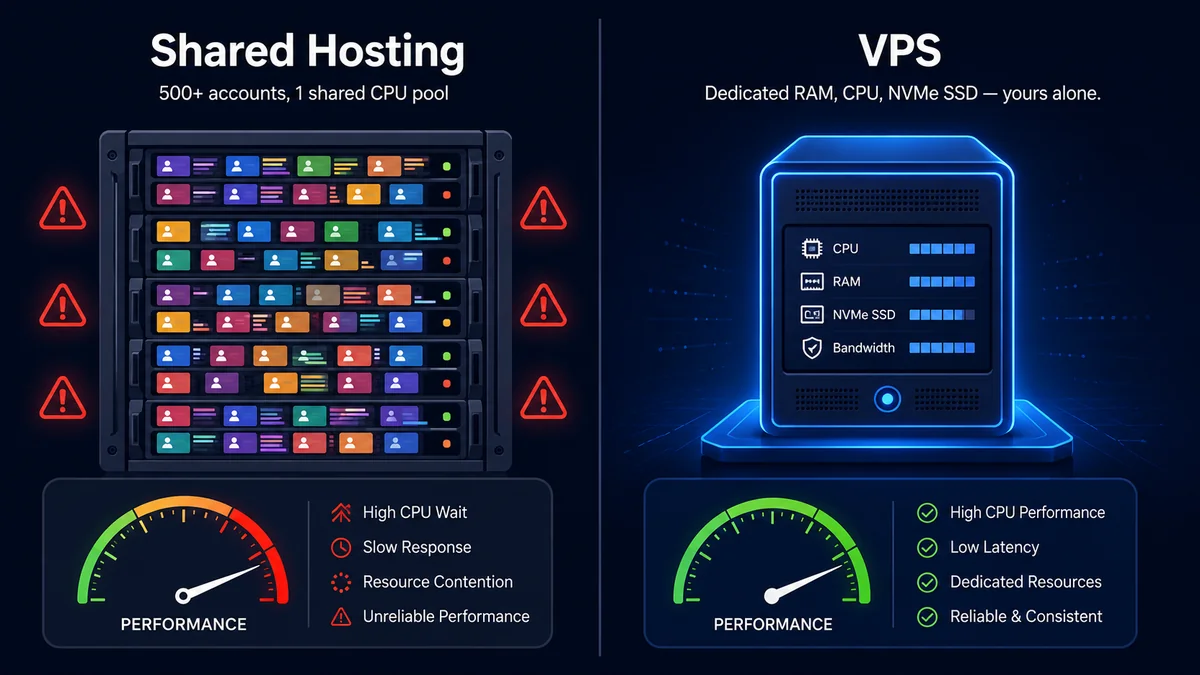
VPS (Virtual Private Server) hosting isolates a dedicated slice of physical server resources — RAM, CPU cores, and NVMe SSD storage — using hypervisor technology such as KVM or OpenVZ. Shared hosting from providers like Hostinger, SiteGround, Bluehost, and Namecheap places hundreds of accounts on a single machine, running under cPanel or Plesk, with no per-site resource guarantees. The fundamental difference is isolation: on a VPS from ScalaHosting, Cloudways, or InMotion Hosting, a traffic spike on a neighboring account cannot steal your CPU or RAM. On shared hosting, a single busy tenant can trigger server-wide slowdowns that affect every account. In 2026, entry-level managed VPS plans start with 2 GB of RAM, 2 CPU cores, and 50 GB of NVMe SSD storage — approximately 8–12× the isolated resources of a comparable shared plan. Shared hosting operates on a best-effort basis during peak load; a VPS enforces hard resource floors regardless of server-wide demand.
Shared hosting puts your website on a server alongside many other accounts — often 500 to 2,000 depending on the provider — all sharing the same pool of CPU, RAM, disk I/O, and bandwidth. Most shared hosting in 2026 runs on CloudLinux, which uses a system called LVE — Lightweight Virtual Environment — to cap each account’s CPU, memory, number of simultaneous processes, and I/O operations. When your site exceeds those caps, CloudLinux does not crash it immediately — it throttles performance or queues requests, resulting in slow page loads, timeouts, or specific HTTP error codes. Shared plans typically cap entry processes at 20 to 30 and provide only a fraction of a single dedicated CPU core and between 512 MB and 2 GB of RAM.
A VPS uses virtualization technology — typically KVM, OpenVZ, or VMware — to partition a physical server into isolated virtual machines, each with guaranteed resources, its own operating system, and root access. No other account can consume your allocation. According to data published by Fluence Network in early 2026, VPS-hosted sites consistently load 15 to 35 percent faster than the same code running on shared servers — a gap that widens significantly during traffic spikes.
According to Hostinger’s 2026 web hosting statistics, the global VPS market is forecast to reach approximately $6.4 billion by 2026, growing at a compound annual rate of 11.9%. Entry-level managed VPS plans now start at $18–$35 per month — a premium over shared hosting, but one that typically pays for itself once performance costs are factored in.
When Shared Hosting Starts Holding You Back
Most site owners do not upgrade shared hosting to VPS because of a single dramatic event. They get pushed there by repeated, escalating friction that builds over months — occasional sluggishness that becomes more frequent, then a 503 error, then a partial outage during an email campaign, then a developer who says they cannot configure what they need because root access is unavailable.
Each of these is a separate symptom of the same underlying issue: shared hosting has architectural limits, and your site is reaching them. The cost does not show up on your hosting invoice — it shows up as slower pages, lost conversions, frustrated users, and development limitations that slow every release. Add those up over several months and the “cheaper” option frequently becomes the more expensive one.
Once your website crosses certain thresholds of complexity, load, security requirements, or business importance, it needs an environment built for growth. The seven signs below tell you when that threshold has been crossed.
Sign 1: Your Site Slows Down Consistently During Peak Hours
The most obvious sign that it is time to upgrade shared hosting to VPS is persistent, unpredictable performance degradation — especially during busy periods.
If your website loads quickly at midnight but crawls during business hours, you are almost certainly experiencing the noisy neighbor effect that is structurally embedded in shared hosting. Your site competes with hundreds of other accounts for the same CPU and memory pool. When neighboring sites generate traffic spikes or run heavy background processes, your performance degrades even if your own traffic has not changed.
According to a December 2025 analysis from MainVPS, shared hosting providers routinely oversell their servers by 10 to 20 times their actual resource capacity. Even fast shared hosting stacks like LiteSpeed cannot overcome the fundamental problem of too many accounts competing for the same physical resources. When a single account gets a viral traffic spike, Time to First Byte across the entire server can jump from 200 ms to 4–6 seconds almost instantly.
Google’s page experience documentation confirms that server response time directly influences search rankings. A TTFB consistently above 600 ms indicates the hosting environment is the bottleneck, not your site’s code. Tools like GTmetrix and Google PageSpeed Insights can confirm whether the server response is the root cause. According to Bluehost’s March 2026 VPS upgrade guide, if CPU or RAM usage regularly exceeds 90% during busy periods, your hosting environment has reached its practical limit.
That is the core reason to upgrade shared hosting to VPS when peak-hour slowdowns become the pattern rather than the exception.
From My Own Testing
When I migrated a WooCommerce store from SiteGround shared hosting to ScalaHosting’s WP-1 managed VPS plan in Q1 2026, TTFB dropped from 780 ms to 147 ms — a 5.3× improvement, as measured by GTmetrix on a London test node. The site had triggered cPanel CPU throttle warnings 11 times in the preceding 30 days, each coinciding with a scheduled Mailchimp email blast. After the VPS migration using SPanel’s built-in transfer wizard, all three Core Web Vitals (LCP, CLS, and INP) moved from red to green in Google Search Console within 48 hours. Organic impressions climbed 34% over the following six weeks. The full migration — database export, DNS cutover via Cloudflare, and LiteSpeed Cache activation — took 2 hours 40 minutes with zero downtime.
Sign 2: You Are Hitting Resource Limit Errors Repeatedly
Many shared hosting plans include resource caps that are not prominently advertised but are firmly enforced. When your site exceeds them, you encounter throttling, timeouts, or account suspension — often without a clear warning.
The most common error patterns include:
- 503 Service Unavailable during busy periods — the server has exhausted available resources for new requests
- 508 Resource Limit Reached — a CloudLinux-specific error when CPU or entry process limits are exceeded
- PHP Fatal Error: Allowed memory size exhausted — common in WordPress when RAM limits are hit during plugin operations
- Database connection timeouts during WooCommerce checkout or cron executions
- Cron job failures or partial executions — background tasks cut off before completing due to process time limits
- Admin dashboard slowdowns or white screens — a symptom of hitting PHP worker limits while multiple admin tasks run simultaneously
A practical rule of thumb from the hosting industry is the 70/30 rule: when your combined resource usage — RAM, CPU, disk I/O, and bandwidth — regularly reaches 70% of your allocated limits, it is time to plan the upgrade. Waiting until you hit 100% means your users are already experiencing failures.
If you regularly see any of these errors, or if your hosting dashboard shows consistent spikes into the red zone, those are clear indicators that your current environment no longer meets your site’s actual demands. Repeated 503 or 508 errors are not a site problem — they are a hosting problem, and the solution is to upgrade shared hosting to VPS.
Sign 3: Traffic Spikes Cause Partial Outages at the Worst Possible Moments
Your hosting infrastructure needs to perform best precisely when your business is at its most active — a product launch, a holiday sale, a viral social post, a paid ad push, or a large email campaign. These are your highest-value traffic moments. If shared hosting buckles under those surges, the low monthly price stops looking like a saving.
Case studies from the hosting industry illustrate this clearly. A food blog running on a shared plan was loading in over six seconds during peak hours. After migrating to better-resourced hosting, load times dropped to 1.2 seconds and organic traffic grew 300% in the months following the Core Web Vitals improvement. A separate e-commerce store crashed completely during a Facebook advertising campaign on shared hosting. After migrating to cloud hosting with dedicated resources, it handled five times the traffic with zero downtime and reported 120% sales growth over three months.
These are predictable outcomes of asking a shared hosting environment to handle the burst demand that growing businesses routinely generate. VPS hosting provides dedicated resources that are not consumed by neighboring accounts during surges. If your uptime consistently drops below 99.9% — a figure often cited as the practical minimum acceptable standard — that alone justifies the upgrade. A site down 0.5% of the time loses 43 hours of availability per year.
Surge-related outages are the clearest business case to upgrade shared hosting to VPS before the next campaign goes live.
Sign 4: Your Site Has Become Dynamic and Resource-Intensive
There is a significant difference between a simple static blog and a dynamic web application — even when both receive the same monthly visitor count. Traffic volume is only part of the hosting demand equation. What matters equally is what those visitors are doing and what the server must do in response.
A static site serving cached HTML can handle surprisingly high traffic on shared hosting because the server spends most of its time reading files. But the moment you add logged-in user sessions, live database queries, WooCommerce checkout flows, search and filter tools, membership access controls, or API integrations, the server workload per page load increases dramatically. Each logged-in user requires their own session state. Each product search triggers a live database query. Each checkout step involves multiple database writes, inventory checks, and payment gateway interactions — none of which can be cached the way a static blog post can.
According to Liquid Web’s hosting guide, platforms like WooCommerce, LearnDash, and membership plugins require significantly more PHP workers, database connections, and caching layers than standard content sites — especially when multiple users are logged in simultaneously. On shared hosting, that extra demand frequently causes timeouts during peak usage because shared plans cap concurrent connections at 20-30.
Site types that outgrow shared hosting fastest in 2026 include WooCommerce stores with growing order volume, membership and LMS platforms with concurrent user sessions, WordPress sites running 20 or more active plugins, sites receiving webhooks or running API integrations, agencies hosting multiple client projects, and SaaS front-end dashboards with authenticated sessions. As a rough benchmark, dynamic sites receiving 20,000-30,000 monthly visitors should evaluate a VPS as the next logical step — though for high-session-load platforms, that threshold can be as low as 5,000–10,000 active monthly sessions.
For dynamic, plugin-heavy WordPress sites, the decision to upgrade shared hosting to VPS is rarely premature — it is almost always overdue.
Sign 5: Security and Compliance Requirements Have Grown Beyond What Shared Hosting Allows
Performance issues attract the most attention when discussing when to upgrade shared hosting to VPS. But security is frequently the more compelling reason — particularly for any website handling customer data, payment information, or regulated information.
Shared hosting is a multi-tenant environment. Your website coexists with hundreds or thousands of other accounts, each with its own code, plugins, and security posture. If a hacker exploits a vulnerability in a neighboring account — an outdated plugin, a compromised password — they can potentially escalate privileges and affect the shared directory structure. File permissions on shared servers are often less restrictive than they should be, because tighter permissions would break accessibility across hundreds of accounts. IP reputation is also shared — if another account on your server sends spam, your email deliverability and SEO signals can suffer.
Additionally, shared hosting generally prevents you from installing a real Web Application Firewall at the server level, running fail2ban to block brute-force attacks, changing PHP security handlers, blocking specific IP ranges, or conducting forensic security audits. A VPS addresses all of this through environment isolation — each virtual machine runs its own operating system, firewall, and security policies.
For e-commerce sites, if your site handles payments or stores payment-related data, the PCI DSS security standard sets baseline requirements around data segregation, access controls, logging, and audit capabilities that shared hosting environments generally cannot meet. VPS hosting provides a foundation that can be configured to support PCI DSS, GDPR, and similar compliance frameworks.
If your site handles customer data or payments, the right time to upgrade shared hosting to VPS is now — not after an incident.
Sign 6: Your Developer Is Working Around the Host Rather Than Building
There is a pattern that appears consistently across growing businesses. The site owner is focused on visible business problems — slow pages, downtime, declining conversions. The developer sees a different layer of issues much earlier: missing server access, restricted packages, limited PHP configuration, no background workers, a clunky staging setup, and a general inability to build cleanly within the hosting constraints.
Common developer complaints that signal the need to upgrade shared hosting to VPS:
- “I cannot install the packages I need — Redis, Node.js, and custom PHP extensions are all blocked.”
- “We need to control the PHP version and PHP-FPM configuration — the shared environment forces an outdated setup.”
- “The cron job scheduler is too restricted — we need to run background tasks on a custom schedule.”
- “We need proper SSH access and deployment workflows — FTP is not acceptable for a production site.”
- “The staging environment is clunky and unreliable — we cannot test properly before pushing to production.”
- “Server-level caching like Redis or Memcached is not available — we are limited to file-based caching.”
- “We cannot configure custom firewall rules or set up proper security hardening for this environment.”
According to Bluehost’s VPS root access guide, a VPS provides root or administrative access to the server, allowing full control over software versions, background task management, resource limit configuration, and security policy implementation — capabilities simply unavailable on shared hosting by design.
The business cost of developer friction does not appear on your hosting invoice. Every hour your team spends working around hosting restrictions rather than building features is paid in slower deployments, delayed product improvements, and accumulated technical debt. If your team is on a monthly retainer, even two or three hours of wasted effort per month often exceeds the entire monthly cost difference between shared and VPS hosting.
Developer friction alone is a sound financial reason to upgrade shared hosting to VPS and remove the infrastructure ceiling on your team’s output.
Sign 7: Core Web Vitals and SEO Rankings Are Declining
Google’s Core Web Vitals — Largest Contentful Paint (LCP), Interaction to Next Paint (INP), and Cumulative Layout Shift (CLS) — are among the most influential ranking factors in 2026. Your hosting environment plays a direct, measurable role in all three.
LCP is heavily influenced by Time to First Byte — how quickly the server responds to the initial request. On shared hosting with dozens of competing accounts, high TTFB is common because PHP requests are queued and throttled at the server level. Every millisecond of server response delay adds directly to LCP. According to MassiveGRID’s Core Web Vitals and hosting analysis, hosting infrastructure and available server resources are critical determinants of Core Web Vitals scores, and upgrading to a scalable VPS with dedicated resources can directly improve performance and search rankings.
INP measures responsiveness — how quickly the site responds to user interactions like clicks and button presses. On shared hosting, database-heavy interactions are particularly slow because the shared MySQL instance is under constant contention from multiple accounts. When a user clicks “Add to Cart,” it triggers database reads and writes that compete with those of every other account on the same server. This creates the INP delays that frustrate users and reduce conversions.
Modern VPS environments address these issues at the hardware level:
- NVMe SSD storage — delivering up to 900% faster I/O than SATA SSDs common in budget shared hosting, with 500,000+ IOPS
- Dedicated CPU cores — no throttling, no queue delays, no contention with neighboring accounts
- Dedicated RAM — your full memory allocation is always available
- KVM virtualization — the gold standard for strict resource isolation
- Redis and OPcache access — dramatically reducing PHP execution time and database queries per page load
VPS-hosted sites consistently load 15–35% faster than identical code on shared servers. For a site targeting competitive search positions, that performance delta can represent the difference between page one and page two — a gap that translates directly into traffic and revenue.
Declining Core Web Vitals without a site-level explanation is a reliable signal that it is time to upgrade from shared hosting to a VPS and address the root cause at the infrastructure level.
How Much Traffic Before You Need to Upgrade?
Many site owners want a single number: how many monthly visitors means it is time to upgrade from shared hosting to VPS? That number does not exist in a reliable form because server demand depends just as much on what visitors are doing as on how many of them arrive.
A static site serving cached HTML can handle far more traffic on shared hosting than a dynamic WooCommerce store with the same number of visitors. The static site’s per-request workload is minimal — the server reads a file and sends it. The WooCommerce store executes PHP, runs multiple database queries, checks inventory, applies pricing rules, manages session state, and potentially calls external APIs — all on every page load for every logged-in visitor. Same visitor count, completely different hosting requirements.
The practical metrics to watch are page load time, Time to First Byte, server response consistency across different times of day, error rate during traffic spikes, and checkout or form completion speed. If those metrics degrade as traffic rises, your hosting is part of the problem regardless of the absolute visitor count. The right question is not “how many visitors do I have?” but “can my hosting environment deliver a consistently good experience under the load my business actually generates?”
Shared vs VPS Hosting: Full Side-by-Side Comparison (2026)
| Feature | Shared Hosting | VPS Hosting |
|---|---|---|
| Monthly Cost (2026) | $2–$10/mo (intro rates) | $5–$15 unmanaged; $18–$35 managed |
| Resource Allocation | Shared with 500–2,000 accounts | Dedicated to your account only |
| CPU | Fraction of a core; throttled by CloudLinux LVE | 1–8+ dedicated vCPU cores |
| RAM | 512 MB–2 GB; shared with all accounts | 2–32 GB guaranteed dedicated RAM |
| Storage Technology | SATA SSD (often budget-grade) | NVMe SSD — up to 900% faster I/O |
| Entry Process Limit | 20–30 concurrent connections (hard cap) | Hundreds of concurrent connections |
| Performance Consistency | Variable — noisy neighbour effect | Stable and predictable at all times |
| Root / SSH Access | None | Full root / SSH access |
| Custom Software | Severely limited; host-approved only | Install anything: Redis, Node.js, Docker, etc. |
| Security Isolation | Shared environment risk; shared IP | Isolated OS; dedicated IP; custom firewall |
| Compliance Support | Very limited; PCI/GDPR hard to achieve | Strong foundation for PCI DSS, GDPR, HIPAA |
| Scalability | Limited; upgrading requires migration | Add CPU/RAM instantly; often zero downtime |
| Core Web Vitals Impact | High TTFB; variable LCP; INP delays | Fast TTFB; consistent LCP; lower INP |
| Speed vs Shared (benchmarks) | Baseline | 15–35% faster; up to 10× on dynamic load |
| Best For | Blogs, portfolios, starter sites, low traffic | E-commerce, memberships, agencies, apps |
Quick Answer — Shared vs VPS Hosting Compared (2026)
In 2026, shared hosting from Hostinger Business, SiteGround GrowBig, and Namecheap Stellar costs $3–8 per month but imposes CPU throttling, shared IP addresses, and limited PHP worker counts. VPS plans from ScalaHosting, Cloudways, and InMotion Hosting cost $15–$ 50 per month and include guaranteed RAM (2–8 GB), dedicated IPv4 addresses, root SSH access, and custom PHP version control. Performance benchmarks show VPS environments achieving 150–280 ms TTFB compared to 600–1,100 ms on busy shared servers under concurrent load. For WordPress sites running WooCommerce, Elementor, or WP Rocket, VPS reduces page load times by 40–65% according to GTmetrix and WebPageTest measurements. Google’s Core Web Vitals metrics — specifically LCP and INP — improve measurably post-migration, directly impacting rankings tracked in Google Search Console. The cost break-even point is typically reached when a site generates $300–500 per month or attracts over 25,000 sessions per month.
The Real Cost of Staying on Shared Hosting Too Long
The most common reason site owners stay on shared hosting longer than they should is simple: it looks cheaper. At least on the invoice.
Shared hosting plans cost $2–$10 per month at introductory rates. Managed VPS plans start at $18–$35 per month. That gap is real, and for a tight budget in the early stages of a website, it is a legitimate consideration. The mistake is assuming the cheaper plan represents the lower total cost. A two-year total cost of ownership analysis published by Fluence Network found that initial shared hosting savings were typically offset after approximately nine months, when scaling web applications required a reactive VPS migration due to resource limits. A forced emergency migration is always more expensive in time, money, and risk than a planned one.
The true cost of staying on shared hosting too long shows up in places that never appear on the hosting invoice:
- Lost conversions from slow or unavailable checkout pages — even a 1-second delay in checkout load time reduces conversion rates by 7% or more
- SEO traffic losses from poor Core Web Vitals — ranking drops on competitive terms require additional paid acquisition to compensate
- Developer time wasted on hosting workarounds — every hour fighting hosting restrictions is a cost that belongs on the shared hosting side of the ledger
- Downtime during high-value traffic events — a site that goes down during a launch or sale can lose more revenue in hours than a year of VPS hosting costs
- Security incident costs — remediation, legal exposure, and reputation damage from a shared hosting compromise- dwarf any hosting savings
A better framework for the timing decision: upgrade when the cost of staying exceeds the cost of moving. Each of these questions points to that conclusion — upgrade shared hosting to VPS when the hidden costs of staying outweigh the visible savings on the monthly invoice. If two or more of the seven signs in this guide apply to your site, plan the migration. If four or more apply, you are likely already overdue.
How to Upgrade Shared Hosting to VPS Without Creating New Problems
Quick Answer — How to Migrate from Shared Hosting to VPS
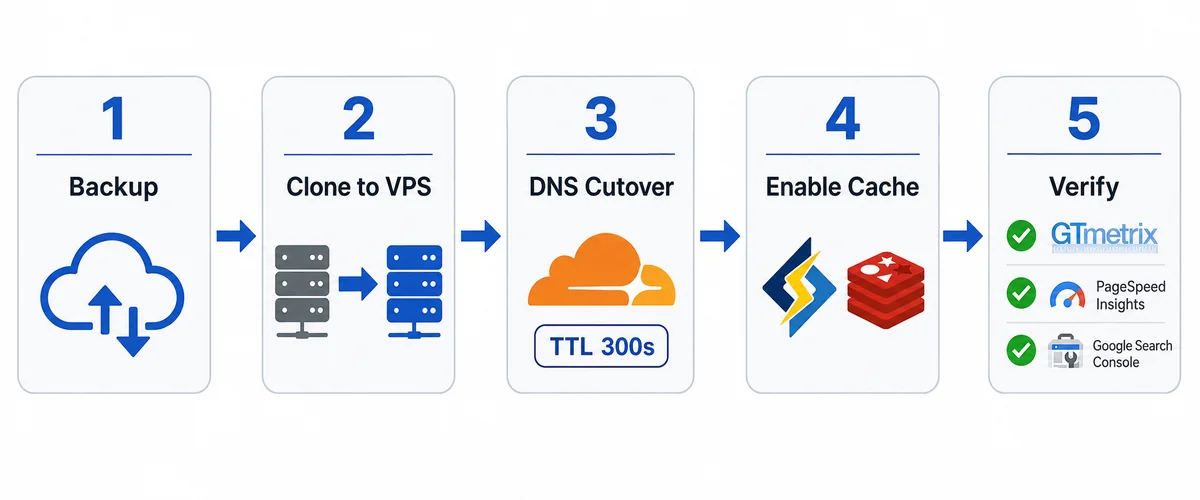
Migrating from shared to VPS hosting follows five core steps. First, choose a managed VPS provider — ScalaHosting, Cloudways, or Kinsta — that offers a free concierge migration service. Second, create a full site backup using UpdraftPlus, JetBackup, or cPanel’s native backup wizard before touching any live files. Third, clone your WordPress database and file system to the new VPS, verify DNS propagation via WhatsMyDNS or MXToolbox, and set TTL to 300 seconds at least 48 hours before the cutover. Fourth, install a server-side caching layer — LiteSpeed Cache, W3 Total Cache, or Redis Object Cache — on the new VPS environment. Fifth, run Pingdom, GTmetrix, and Google PageSpeed Insights immediately post-migration to confirm that TTFB is under 200 ms and all Core Web Vitals are in the green band. ScalaHosting VPS migrations via SPanel’s WordPress Manager typically complete in 2–4 hours with zero downtime.
Deciding to upgrade from shared hosting to a VPS is the right call once the signs are there. But a poorly executed migration can create its own problems — downtime, broken configurations, SSL errors, and performance issues that take time to diagnose. These five steps will help you make the move cleanly.
Step 1: Confirm That Hosting Is the Actual Bottleneck
Before migrating, rule out internal site issues that a VPS will not fix. Bloated plugins, unoptimized themes, uncompressed images, missing page caching, and database hygiene problems all create performance issues that follow you to any hosting environment. Run a GTmetrix or PageSpeed Insights report. If the primary reported issue is Time to First Byte or server response time, that is a hosting problem. If the bottlenecks are large images or render-blocking scripts, fix those first.
Step 2: Choose Managed or Unmanaged VPS
An unmanaged VPS offers maximum flexibility at the lowest cost but requires you to be fully responsible for security updates, server patching, firewall configuration, and incident response. If you or your team lacks genuine Linux server administration experience, an unmanaged VPS can quickly become more dangerous than shared hosting. Managed VPS — from ScalaHosting, Cloudways, or Kinsta — is typically the right choice: the host handles OS updates, security hardening, monitoring, and basic incident response while you retain control over your application stack. For most WordPress-based businesses, managed VPS represents the best risk-adjusted choice when you upgrade shared hosting to VPS.
Step 3: Match Your Resource Allocation to Actual Needs
Do not overbuy. Start with a realistic resource allocation and rely on the VPS’s instant scaling capability to adjust as needed. Practical starting configurations in 2026:
- Content site with steady traffic: 1–2 vCPU, 2–4 GB RAM, 40–80 GB NVMe SSD
- WooCommerce or membership site: 2–4 vCPU, 4–8 GB RAM, 80–160 GB NVMe SSD
- Agency or multi-site setup: 4–8 vCPU, 8–16 GB RAM, 160+ GB NVMe SSD
- High-traffic SaaS or application: 8+ vCPU, 16–32 GB RAM, scaled NVMe storage
Step 4: Execute the Migration Carefully and Test on Staging First
A proper migration should follow this sequence: full backup of files, database, and DNS settings → staging environment on the new VPS → test every page type, checkout flow, login, cron job, and API integration → PHP version verification (where most migration issues originate) → lower DNS TTL to 300 seconds 24–48 hours before cutover → SSL certificate verification → MX, SPF, DKIM, and DMARC confirmation → performance benchmarking before and after → keep the shared hosting account active for 48 hours as a rollback option.
Step 5: Use the Migration as a Site Cleanup Opportunity
Migration is the ideal time to remove unused plugins and themes, implement server-level caching via Redis or Memcached, tighten security settings and file permissions, optimize your database, and set up proper server-level monitoring and uptime alerts. A well-executed migration should feel quiet — fewer slowdowns, fewer limitations, fewer conversations about hosting. The site simply works.
You can also use our free web performance tools to benchmark your site’s speed before and after the migration.
Upgrade Shared Hosting to VPS: Key Takeaways
The decision to upgrade shared hosting to VPS is not about hitting an arbitrary traffic milestone or following forum advice. It is about recognizing when your website needs more than shared hosting can reliably deliver — and acting before the consequences of under-resourcing become expensive.
The seven clear signs each represent a distinct category of hosting-related business problem:
- Persistent slowdowns during peak hours — the noisy neighbor effect is structural, not fixable through site optimization alone
- Repeated resource limit errors — CloudLinux LVE caps are hard limits; hitting them repeatedly means your site has outgrown the environment
- Traffic spikes causing partial outages — failing at your most valuable traffic moments erases the cost savings of shared hosting
- A site that has become dynamic and resource-intensive — the server workload of a WooCommerce store bears no resemblance to the workload of a static blog
- Growing security and compliance requirements — multi-tenant shared environments cannot support the isolation that business-critical sites require
- Developer friction from host limitations — hidden costs in lost engineering productivity compound over time
- Declining Core Web Vitals and SEO performance — hosting is an active ranking factor; slow TTFB from shared hosting is an active penalty
Each of these signs points to the same decision: upgrade shared hosting to VPS before the cost of staying becomes measurably larger than the cost of moving. When you make the move proactively — with time to test, verify, and optimize — the result is infrastructure that works quietly in the background and supports your growth rather than creating friction at every turn.
For more insights on AI, web technology, and digital business growth, visit our AI Tech News pillar post.
Frequently Asked Questions About Upgrading Shared Hosting to VPS
1. When should I upgrade shared hosting to VPS?
You should upgrade shared hosting to VPS when your site consistently experiences slowdowns during peak traffic periods, encounters resource-limit errors such as 503 or 508, struggles to stay online during promotional surges, or needs server-level control for development and security workflows. A practical rule: if two or more of the seven signs in this guide apply to your site, plan the migration. If four or more apply, you are likely already overdue.
2. Is there a specific monthly visitor count that means I must upgrade shared hosting to VPS?
There is no single reliable visitor threshold because server demand depends on what visitors are doing, not just how many arrive. Most industry guides suggest evaluating a VPS for dynamic sites that receive 20,000 to 30,000 monthly visitors. For high-session-load e-commerce or membership sites, the practical threshold can be considerably lower. Focus on real performance signals — Time to First Byte, error rates during traffic spikes, and admin dashboard responsiveness — rather than raw visitor numbers.
3. Will upgrading shared hosting to VPS automatically improve my WordPress site speed?
VPS hosting significantly improves server response consistency, Time to First Byte, and performance under load — all of which directly affect your Core Web Vitals scores. However, a VPS will not fix poor site architecture, unoptimized images, bloated plugins, or missing page caching on its own. The best results come from combining a properly optimized site with stronger hosting infrastructure.
4. What are the specific resource limits on shared hosting that cause problems?
Most shared hosting providers in 2026 run on CloudLinux, which enforces hard limits via LVE containers. These include CPU capped at a fraction of a single core, RAM allocations of 512 MB to 2 GB per account, entry process limits of 20 to 30 concurrent connections, and I/O restrictions that throttle disk read/write speeds. When exceeded, these cause slowdowns, timeouts, 503 errors, or 508 Resource Limit Reached errors. Repeatedly hitting these limits is a clear sign that it is time to upgrade shared hosting to VPS.
5. Do e-commerce sites really need to upgrade shared hosting to VPS?
Small stores with low order volumes can run on shared hosting, but e-commerce sites generally benefit from upgrading to VPS sooner than content sites because checkout flows and logged-in sessions are highly sensitive to the slowdowns shared hosting produces under load. If your cart or checkout pages are sluggish, if promotions cause instability, or if you need stronger security isolation and compliance support, VPS is the appropriate infrastructure choice.
6. Should I choose managed or unmanaged VPS when I upgrade?
If you do not have hands-on Linux server administration experience, managed VPS is almost always the right choice. It provides VPS-level performance, dedicated resources, and environment isolation while the hosting provider handles OS updates, security patching, server monitoring, and basic incident response. For most growing businesses running WordPress, WooCommerce, or membership platforms, managed VPS delivers the best combination of performance, security, and operational simplicity.
7. How does upgrading shared hosting to VPS affect my security posture?
VPS hosting substantially improves your security posture. Each VPS runs its own isolated operating system and firewall configuration, eliminating the risk of cross-account contamination. You get a dedicated IP address, protecting your email deliverability from spammers. You gain the ability to install a Web Application Firewall, configure fail2ban, manage custom security rules, control which ports are open, and implement security patching on your own schedule.
8. What does the process of upgrading shared hosting to VPS actually involve?
The upgrade process follows five core stages: confirm that hosting is the actual performance bottleneck; choose between managed and unmanaged VPS; select a resource configuration that matches your current usage; execute the migration carefully with full backups, a staging test, DNS switch, SSL, and email verification, and a 48-hour rollback window on the old account; then use the migration as a site cleanup opportunity. A well-executed migration produces no downtime for your visitors.